---
title: 2FAuth
url: 'https://niklas-stephan.de/en/wiki/self-hosted/2fauth'
markdown: 'https://niklas-stephan.de/en/wiki/self-hosted/2fauth.md'
lang: en
date: '2026-11-07'
description: '2FAuth Status checked 2026-11-28: no instance deployed. Setup details as recorded at the page date. Warning Status: this image is no longer deployed; OTP is handled by the OTP functionality integrated in Bitwarden. 2FAuth is a one-time password (OTP) generator and replaces client-side two-fac…'
---

#  2FAuth 

*Status checked 2026-11-28: no instance deployed. Setup details as recorded at the page date.*

 Warning

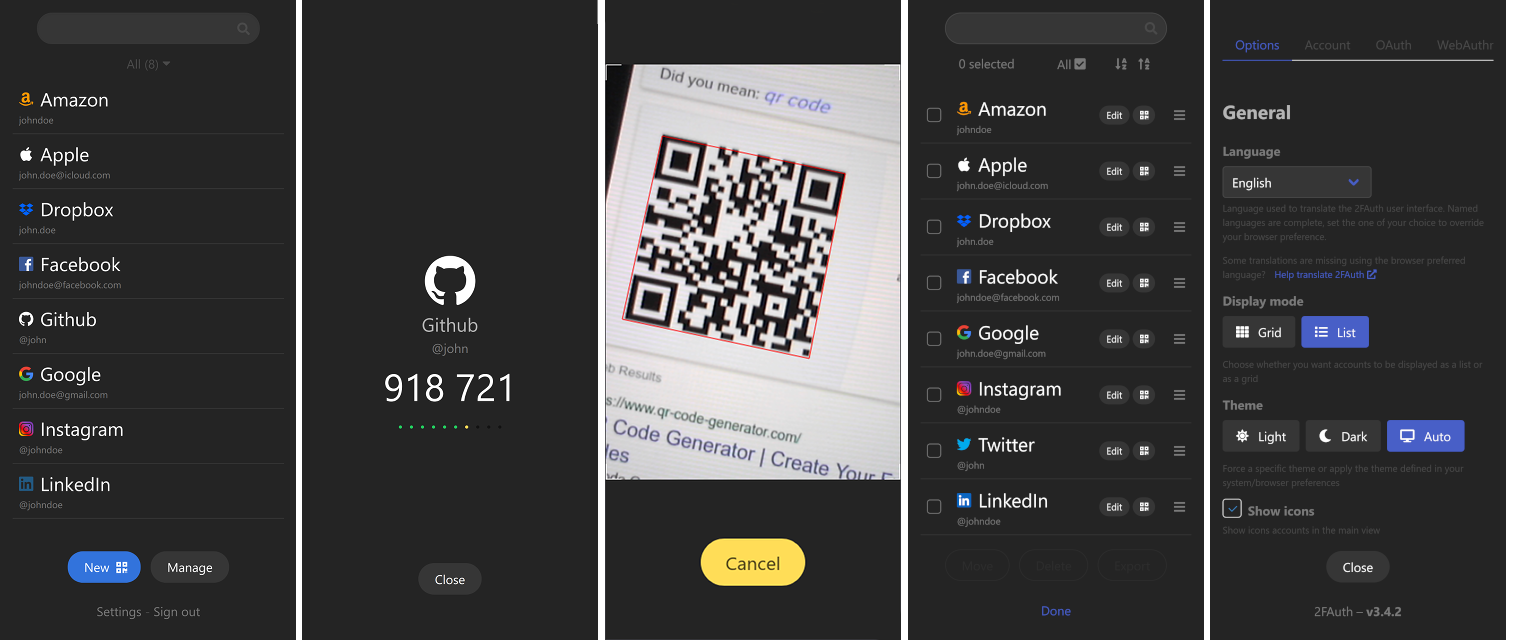
Status: this image is no longer deployed; OTP is handled by the OTP functionality integrated in Bitwarden. ![](https://niklas-stephan.de/user/pages/wiki/02.self-hosted/2fauth/2fauth-screenshots-dark.png)

2FAuth is a one-time password (OTP) generator and replaces client-side two-factor authentication apps. It can additionally be installed as a browser add-on and also as a PWA.

## Installation

### compose.yml

```yaml
<span class="hljs-attr">services:</span>
  <span class="hljs-attr">2fauth:</span>
    <span class="hljs-attr">image:</span> <span class="hljs-string">2fauth/2fauth:latest</span>
    <span class="hljs-attr">container_name:</span> <span class="hljs-string">2fauth</span>
    <span class="hljs-attr">volumes:</span>
      <span class="hljs-bullet">-</span> <span class="hljs-string">./data:/2fauth</span>
    <span class="hljs-attr">networks:</span>
      <span class="hljs-bullet">-</span> <span class="hljs-string">caddy</span>
    <span class="hljs-attr">restart:</span> <span class="hljs-string">unless-stopped</span>
    <span class="hljs-attr">env_file:</span> <span class="hljs-string">./.env</span>
<span class="hljs-attr">networks:</span>
  <span class="hljs-attr">caddy:</span>
    <span class="hljs-attr">external:</span> <span class="hljs-literal">true</span>
```

### .env

```yaml
<span class="hljs-string">APP_NAME=2FAuth</span>
<span class="hljs-string">APP_ENV=local</span>
<span class="hljs-string">APP_TIMEZONE=Europe/Berlin</span>
<span class="hljs-string">APP_DEBUG=false</span>
<span class="hljs-string">SITE_OWNER=YOUREMAIL</span>
<span class="hljs-comment"># The encryption key for  our database and sessions. Keep this very secure.</span>
<span class="hljs-comment"># If you generate a new one all existing data must be considered LOST.</span>
<span class="hljs-comment"># Change it to a string of exactly 32 chars or use command `php artisan key:generate` to generate it</span>
<span class="hljs-string">APP_KEY=YOURKEY</span>
<span class="hljs-comment"># This variable must match your installation's external address.</span>
<span class="hljs-comment"># Webauthn won't work otherwise.</span>
<span class="hljs-string">APP_URL=YOURURL</span>
<span class="hljs-comment"># If you want to serve js assets from a CDN (like https://cdn.example.com),</span>
<span class="hljs-comment"># uncomment the following line and set this var with the CDN url.</span>
<span class="hljs-comment"># Otherwise, let this line commented.</span>
<span class="hljs-comment"># - ASSET_URL=http://localhost</span>
<span class="hljs-comment">#</span>
<span class="hljs-comment"># Turn this to true if you want your app to react like a demo.</span>
<span class="hljs-comment"># The Demo mode reset the app content every hours and set a generic demo user.</span>
<span class="hljs-string">IS_DEMO_APP=false</span>
<span class="hljs-comment"># The log channel defines where your log entries go to.</span>
<span class="hljs-comment"># 'daily' is the default logging mode giving you 7 daily rotated log files in /storage/logs/.</span>
<span class="hljs-comment"># Also available are 'errorlog', 'syslog', 'stderr', 'papertrail', 'slack' and a 'stack' channel</span>
<span class="hljs-comment"># to combine multiple channels into a single one.</span>
<span class="hljs-string">LOG_CHANNEL=daily</span>
<span class="hljs-comment"># Log level. You can set this from least severe to most severe:</span>
<span class="hljs-comment"># debug, info, notice, warning, error, critical, alert, emergency</span>
<span class="hljs-comment"># If you set it to debug your logs will grow large, and fast. If you set it to emergency probably</span>
<span class="hljs-comment"># nothing will get logged, ever.</span>
<span class="hljs-string">LOG_LEVEL=notice</span>
<span class="hljs-comment"># Database config (can only be sqlite)</span>
<span class="hljs-string">DB_DATABASE="/srv/database/database.sqlite"</span>
<span class="hljs-comment"># If you're looking for performance improvements, you could install memcached.</span>
<span class="hljs-string">CACHE_DRIVER=file</span>
<span class="hljs-string">SESSION_DRIVER=file</span>
<span class="hljs-comment"># Mail settings</span>
<span class="hljs-comment"># Refer your email provider documentation to configure your mail settings</span>
<span class="hljs-comment"># Set a value for every available setting to avoid issue</span>
<span class="hljs-string">MAIL_MAILER=log</span>
<span class="hljs-string">MAIL_HOST=</span>
<span class="hljs-string">MAIL_PORT=</span>
<span class="hljs-string">MAIL_USERNAME=</span>
<span class="hljs-string">MAIL_PASSWORD=</span>
<span class="hljs-string">MAIL_ENCRYPTION=tls</span>
<span class="hljs-string">MAIL_FROM_NAME=2</span> <span class="hljs-string">Factor</span> <span class="hljs-string">Authentication</span>
<span class="hljs-string">MAIL_FROM_ADDRESS=</span>
<span class="hljs-comment"># SSL peer verification.</span>
<span class="hljs-comment"># Set this to false to disable the SSL certificate validation.</span>
<span class="hljs-comment"># WARNING</span>
<span class="hljs-comment"># Disabling peer verification can result in a major security flaw.</span>
<span class="hljs-comment"># Change it only if you know what you're doing.</span>
<span class="hljs-string">MAIL_VERIFY_SSL_PEER=true</span>
<span class="hljs-comment"># API settings</span>
<span class="hljs-comment"># The maximum number of API calls in a minute from the same IP.</span>
<span class="hljs-comment"># Once reached, all requests from this IP will be rejected until the minute has elapsed.</span>
<span class="hljs-comment"># Set to null to disable the API throttling.</span>
<span class="hljs-string">THROTTLE_API=60</span>
<span class="hljs-comment"># Authentication settings</span>
<span class="hljs-comment"># The number of times per minute a user can fail to log in before being locked out.</span>
<span class="hljs-comment"># Once reached, all login attempts will be rejected until the minute has elapsed.</span>
<span class="hljs-comment"># This setting applies to both email/password and webauthn login attemps.</span>
<span class="hljs-string">LOGIN_THROTTLE=5</span>
<span class="hljs-comment"># The default authentication guard</span>
<span class="hljs-comment"># Supported:</span>
<span class="hljs-comment"># 'web-guard' : The Laravel built-in auth system (default if nulled)</span>
<span class="hljs-comment"># 'reverse-proxy-guard' : When 2FAuth is deployed behind a reverse-proxy that handle authentication</span>
<span class="hljs-comment"># WARNING</span>
<span class="hljs-comment"># When using 'reverse-proxy-guard' 2FAuth only look for the dedicated headers and skip all other built-in</span>
<span class="hljs-comment"># authentication checks. That means your proxy is fully responsible of the authentication process, 2FAuth will</span>
<span class="hljs-comment"># trust him as long as headers are presents.</span>
<span class="hljs-string">AUTHENTICATION_GUARD=web-guard</span>
<span class="hljs-comment"># Authentication log retention time, in days.</span>
<span class="hljs-comment"># Log entries older than that are automatically deleted.</span>
<span class="hljs-string">AUTHENTICATION_LOG_RETENTION=365</span>
<span class="hljs-comment"># Name of the HTTP headers sent by the reverse proxy that identifies the authenticated user at proxy level.</span>
<span class="hljs-comment"># Check your proxy documentation to find out how these headers are named (i.e 'REMOTE_USER', 'REMOTE_EMAIL', etc...)</span>
<span class="hljs-comment"># (only relevant when AUTHENTICATION_GUARD is set to 'reverse-proxy-guard')</span>
<span class="hljs-string">AUTH_PROXY_HEADER_FOR_USER=null</span>
<span class="hljs-string">AUTH_PROXY_HEADER_FOR_EMAIL=null</span>
<span class="hljs-comment"># Custom logout URL to open when using an auth proxy.</span>
<span class="hljs-string">PROXY_LOGOUT_URL=null</span>
<span class="hljs-comment"># WebAuthn settings</span>
<span class="hljs-comment"># Relying Party name, aka the name of the application. If blank, defaults to APP_NAME. Do not set to null.</span>
<span class="hljs-string">WEBAUTHN_NAME=2FAuth</span>
<span class="hljs-comment"># Relying Party ID, should equal the site domain (i.e 2fauth.example.com).</span>
<span class="hljs-comment"># If null, the device will fill it internally (recommended)</span>
<span class="hljs-comment"># See https://webauthn-doc.spomky-labs.com/prerequisites/the-relying-party#how-to-determine-the-relying-party-id</span>
<span class="hljs-string">WEBAUTHN_ID=null</span>
<span class="hljs-comment"># Use this setting to control how user verification behave during the</span>
<span class="hljs-comment"># WebAuthn authentication flow.</span>
<span class="hljs-comment">#</span>
<span class="hljs-comment"># Most authenticators and smartphones will ask the user to actively verify</span>
<span class="hljs-comment"># themselves for log in. For example, through a touch plus pin code,</span>
<span class="hljs-comment"># password entry, or biometric recognition (e.g., presenting a fingerprint).</span>
<span class="hljs-comment"># The intent is to distinguish one user from any other.</span>
<span class="hljs-comment">#</span>
<span class="hljs-comment"># Supported:</span>
<span class="hljs-comment"># 'required': Will ALWAYS ask for user verification</span>
<span class="hljs-comment"># 'preferred' (default) : Will ask for user verification IF POSSIBLE</span>
<span class="hljs-comment"># 'discouraged' : Will NOT ask for user verification (for example, to minimize disruption to the user interaction flow)</span>
<span class="hljs-string">WEBAUTHN_USER_VERIFICATION=preferred</span>
<span class="hljs-comment">#### SSO settings (for Socialite) ####</span>
<span class="hljs-comment"># Uncomment and complete lines for the OAuth providers you want to enable.</span>
<span class="hljs-comment"># - OPENID_AUTHORIZE_URL=</span>
<span class="hljs-comment"># - OPENID_TOKEN_URL=</span>
<span class="hljs-comment"># - OPENID_USERINFO_URL=</span>
<span class="hljs-comment"># - OPENID_CLIENT_ID=</span>
<span class="hljs-comment"># - OPENID_CLIENT_SECRET=</span>
<span class="hljs-comment"># - OPENID_HTTP_VERIFY_SSL_PEER=true</span>
<span class="hljs-comment"># Can also be the path to a custom certificate on disk, i.e</span>
<span class="hljs-comment"># - OPENID_HTTP_VERIFY_SSL_PEER=/path/to/cert.pem</span>
<span class="hljs-comment">#</span>
<span class="hljs-comment"># - GITHUB_CLIENT_ID=</span>
<span class="hljs-comment"># - GITHUB_CLIENT_SECRET=</span>
<span class="hljs-comment"># Use this setting to declare trusted proxied.</span>
<span class="hljs-comment"># Supported:</span>
<span class="hljs-comment"># '*': to trust any proxy</span>
<span class="hljs-comment"># A comma separated IP list: The list of proxies IP to trust</span>
<span class="hljs-string">TRUSTED_PROXIES=null</span>
<span class="hljs-comment"># Proxy for outgoing requests like new releases detection or logo fetching.</span>
<span class="hljs-comment"># You can provide a proxy URL that contains a scheme, username, and password.</span>
<span class="hljs-comment"># For example, "http://username:password@192.168.16.1:10".</span>
<span class="hljs-string">PROXY_FOR_OUTGOING_REQUESTS=null</span>
<span class="hljs-comment"># Set this to true to enable Content-Security-Policy (CSP).</span>
<span class="hljs-comment"># CSP helps to prevent or minimize the risk of certain types of security threats.</span>
<span class="hljs-comment"># This is mainly used as a defense against cross-site scripting (XSS) attacks, in which</span>
<span class="hljs-comment"># an attacker is able to inject malicious code into the web app</span>
<span class="hljs-string">CONTENT_SECURITY_POLICY=false</span>
<span class="hljs-comment"># Leave the following configuration vars as is.</span>
<span class="hljs-comment"># Unless you like to tinker and know what you're doing.</span>
<span class="hljs-string">BROADCAST_DRIVER=log</span>
<span class="hljs-string">QUEUE_DRIVER=sync</span>
<span class="hljs-string">SESSION_LIFETIME=120</span>
<span class="hljs-string">REDIS_HOST=127.0.0.1</span>
<span class="hljs-string">REDIS_PASSWORD=null</span>
<span class="hljs-string">REDIS_PORT=6379</span>
<span class="hljs-string">PUSHER_APP_ID=</span>
<span class="hljs-string">PUSHER_APP_KEY=</span>
<span class="hljs-string">PUSHER_APP_SECRET=</span>
<span class="hljs-string">PUSHER_APP_CLUSTER=mt1</span>
<span class="hljs-string">VITE_PUSHER_APP_KEY=null</span>
<span class="hljs-string">VITE_PUSHER_APP_CLUSTER=null</span>
<span class="hljs-string">MIX_ENV=local</span>
<span class="hljs-string">TZ=Europe/Berlin</span>
```

### Reverse Proxy

Für Caddy:

```caddyfile
2fa.handtrixxx.com {
    reverse_proxy 2fauth:8000
}
```

## Alternativen

- [Google Authenticator](https://play.google.com/store/apps/details?hl=en)
- Bitwarden (integrated OTP functionality)

## Quellen / Links

- <https://docs.2fauth.app>
- <https://github.com/Bubka/2FAuth-WebExtension>

 self-hostedsecurity2faretired

---

## Navigation

- Parent: [Self-hosted](https://niklas-stephan.de/en/wiki/self-hosted.md)
- Next: [Artalk](https://niklas-stephan.de/en/wiki/self-hosted/artalk.md)
